

Our fall break at school started today, and my journey migrating 39 websites to a new web host continued. My October 1st post, “AI Assisted Blogging Milestone,” includes some of the details, including my extensive use of Claude AI to manage both my old and new web hosts via the MacOS Terminal / command line. Tonight I’m excited to report I’ve successfully archived two backups of my primary Twitter / X account (which I don’t use any more) and built a fun landing page (screenshot below) for the links, and “digitally resurrected” my personal “publications archive” which runs OJS (Open Journal Systems,) which has been offline for years because of technical upgrade difficulties I couldn’t figure out by myself. (It has about 65 articles I published since 1997.) Now that I’m working with Claude, however, the rules of the server management game have changed significantly for me.
 for his current online spaces.](https://substackcdn.com/image/fetch/$s_!wDFJ!,f_auto,q_auto:good,fl_progressive:steep/https%3A%2F%2Fsubstack-post-media.s3.amazonaws.com%2Fpublic%2Fimages%2F0e317e78-0233-4fb6-bb56-369365c5006d_903x850.jpeg "A retro pixel-art webpage header reads \"TWITTER ARCHIVES OF WES FRYER\" set against a dark purple, starry sky with pixelated clouds and floating floppy disks. An introductory box explains that Wes Fryer created this self-hosted archive of his tweets spanning from his start on the platform in 2007. Below, the \"Open an archive\" section provides two yellow buttons to browse tweet collections through February 2018 and October 2026. A final section titled \"Where I share now\" includes a green button linking to [wesfryer.com/after](https://www.google.com/search?q=https%3A%2F%2Fwesfryer.com%2Fafter) for his current online spaces.")
I also was able to “digitally resuscitate” my personal books website (books.wesfryer.com,) which runs the open source version of Pressbooks. Because I couldn’t figure out (again) how to upgrade and maintain that site a year or so after I started using it, I migrated and have been paying for my next book, “Pocket Share Jesus: Be a Digital Witness for Christ” on the commercial Pressbooks.pub website.
I have MANY updates to make on both my publications archive and Pressbooks website, but I am OVER THE MOON that both these technically complicated websites are not only moved to a new web host, but also fully functional (from what I’ve tested so far) and also fully updated, from a security standpoint.
This evening was my first time to ever use “Claude Code,” which is an agentic assistant that was able to autonomously make more changes on my servers and work more independently with less required input from me, than I was able to setup just using the standard Claude chat interface. I’ve heard Jason Neiffer talk about his experiments with agentic AI tools for many weeks on our EdTech Situation Room podcast shows, so I’m glad to gain some experience of my own today. Goodness these tools are SO capable and powerful. And getting better every day.
One thing that has been SUPER impressive to experience is how thorough Claude has been creating backups of all my data and sites, and moving them into “staging” folders before making sites “live” on my new web host. I’m aware this is a best practice for website upgrades and migration, but it’s been amazing to have an AI assistant guide me through these workflows and processes.
As an example, here is the plan Claude proposed and we followed to migrate one of the remaining WordPress sites on my server I want to archive as static HTML and copy over to my new web host:
Check disk space and how big /seedlings/ is.
Make a full backup of the WordPress copy (files plus the database dump we already saved) on the Linode, then pull a copy to your Mac.
Crawl the live /seedlings/ site into plain HTML files in a staging folder.
Compare the crawl with the live site and check it for missing pages or images.
Swap the static copy in, move the WordPress files out of the web root, and block PHP in that folder.
I’ve also LOVED using a “Site Migration Roadmap Tracker” document / artifact which Claude has regularly updated for me each evening as I’ve been working on this project.
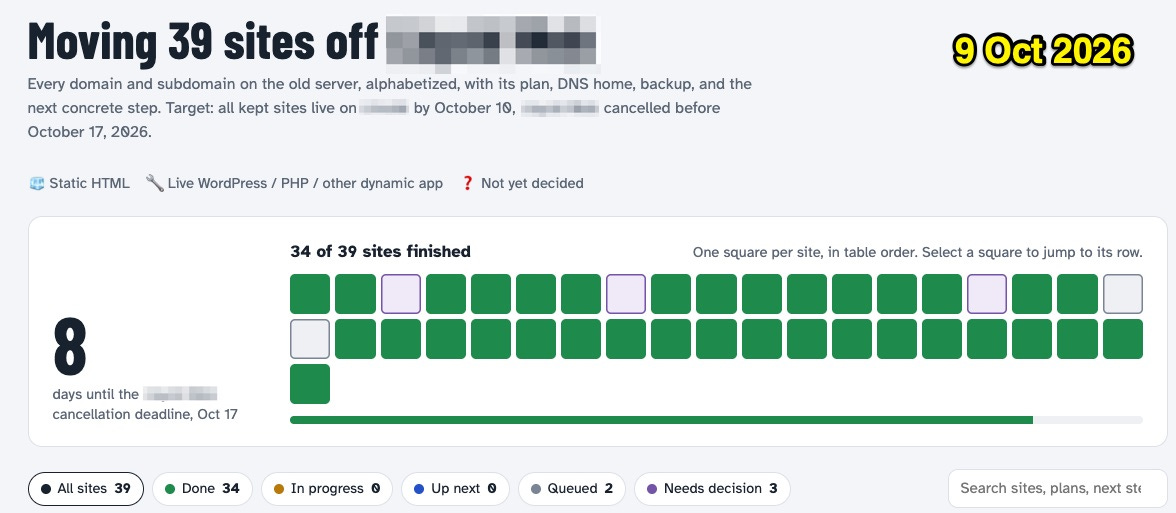
Using AI in this way to help with project management can be a HUGE benefit, especially since it’s able to capably handle, import, and organize “unstructured data / input” like a top flight human assistant.
34 websites migrated / archived, 5 more to go!
AI Attribution: I did NOT use any AI tools to draft, edit or write any part of this article / post, other than the bulleted list of the “seedlings” website migration plan.
Even more: I’ve archived over 6000 blog posts and 400 podcasts on speedofcreativity.org. Use the drop down menus at the top to dive into the #edtech goodness!