
Normalize Your Video Audio with Auphonic
(and QuickTime Player)

One of the most common problems I see in student and creator videos alike is inconsistent audio. You shoot a clip facing the camera, then turn around to capture something else — and suddenly the audio levels are completely different. The result is a video that sounds unprofessional, even when the content is great. The good news? This is an easy fix with the right tools, and in a recent tutorial I recorded, I walk through my go-to workflow for normalizing audio in video using a combination of free and low-cost tools.
The star of the show is Auphonic, a web-based audio processing tool I’ve been relying on for years — for podcasting, digital storytelling, quick edit videography, and more. Auphonic’s adaptive leveler, voice EQ, and loudness normalization work together to even out your audio across an entire recording. You can actually see the difference visually: the input waveform is uneven and low, while the output is boosted and consistent all the way across. Auphonic offers up to two hours of processing for free per month, and if you need more or want to remove the audio watermark, you can purchase one-time credit bundles — I’ve found five hours for $12 to be a great value.
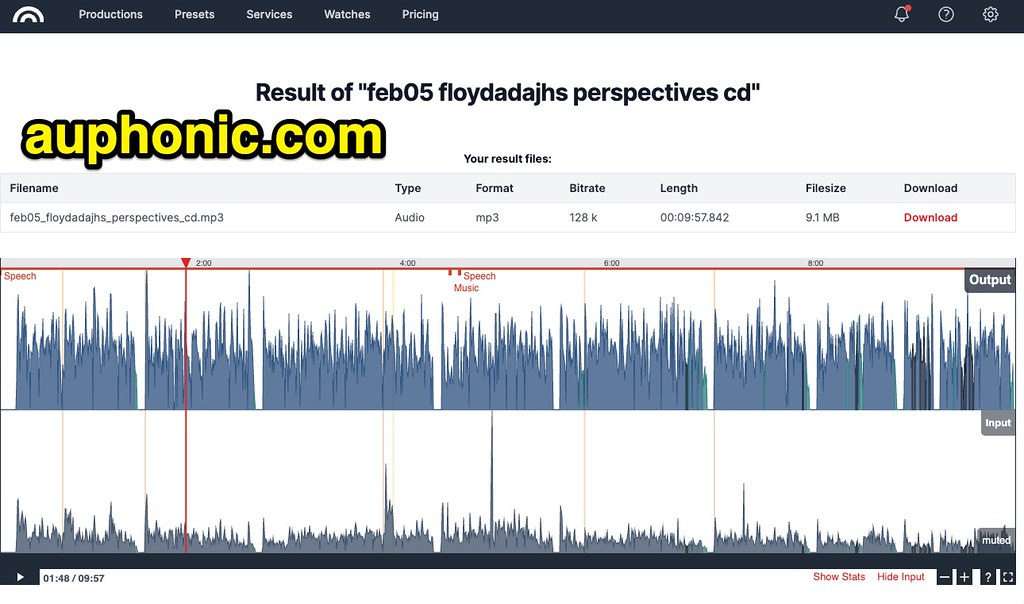
My workflow keeps things simple: after editing my video in InShot on my iPhone, I export just the audio using QuickTime Player on my Mac (File → Export → Audio Only). I then drop that audio file into Auphonic, select the “Voice Cleaner” preset, and let it process. Because I’m working with audio only rather than a full video file, the processing is fast. Once I download the normalized audio file, I return to QuickTime Player, remove the original audio track from my video (Edit → Remove Audio), and drag in the fixed audio file. A quick export at the original resolution — 1080p in my case — and the video is ready to upload.
The specific video I used to demonstrate this workflow was a fun one: a multi-clip backyard project documenting my ongoing “war with the squirrels” and a new ZigBee smart plug setup for my Home Assistant smart home project. It had five different clips shot from different angles with noticeably different audio levels — exactly the kind of real-world scenario where Auphonic shines. If you’re a video creator, teacher, or student producing multi-clip videos, this workflow is absolutely worth adding to your toolkit. Better audio makes every story more compelling — and with tools like Auphonic and QuickTime Player, there’s no reason to settle for uneven sound.
Check out more of my tutorial videos in this YouTube playlist and on PlayingWithMedia.com.
I also shared this on my blog: https://www.speedofcreativity.org/2026/02/17/normalize-your-video-audio-with-auphonic-and-quicktime-player/